|
1, Load up the image you want to "age".
2, First off all Desaturate
the image (make it black and white). Do this by clicking on
Image, Adjust, and then Desaturate.
(Image> Adjust>
Desaturate)
3. After desaturing the
image, create a new layer. Make sure that u have the defaul
colors selected by pressing "D". Fill the new layer
black. Now add noise. With a value of 45. Make sure Gaussion
and monochromatic are selected.
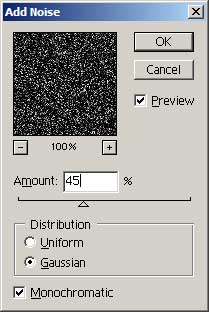
The result should look
similar to this:
4, Now select the the
magic wand tool,(or press w) and select the black background.
Once selected delete it.
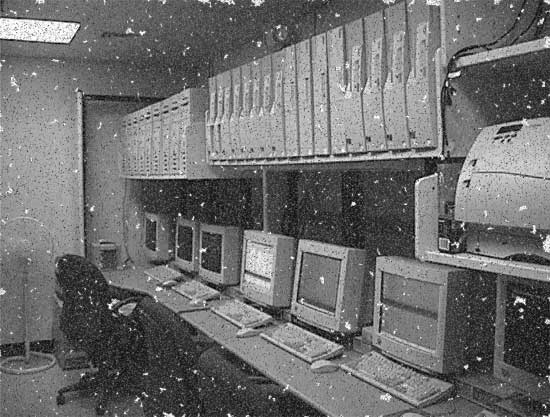
5, If there are bits of
white pieces left, keep them, they make it look even better.Now
use the Ripple effect, about 4-5 times, till u get a nice
result. Use the highest value of 999% and medium in the dropdown
box. Also sharpen the image a bit.
(Filter > Distort > Ripple) x4
(Filter > Sharpen > Sharpen) x2

6, Ah looks nice already
:D To make it even better, duplicate the layer, and add gaussion
blur to it.
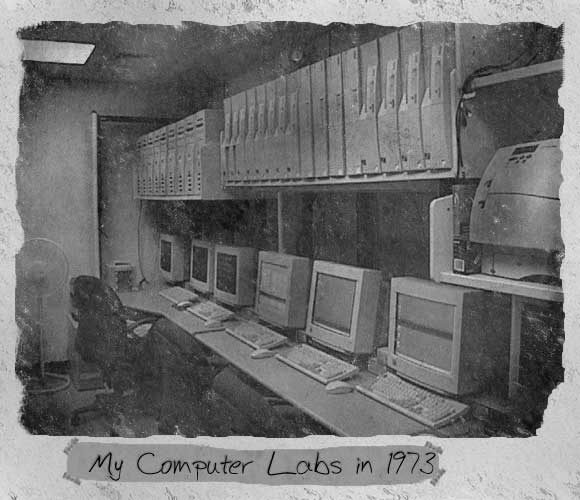
7, There we go, looks
quite old doesnt it?
|
